1.7. Viewing Table Data
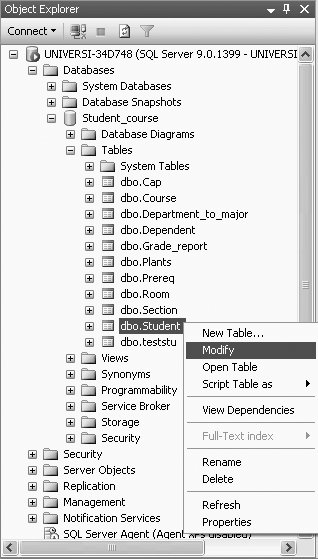
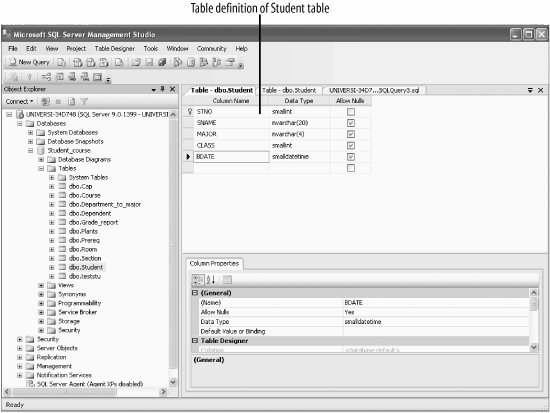
To view the data in a table, right click on the table, as shown in Figure 1-22, and select Open Table. For example, to view the data of the Student table, right-click on the Student table, and select Open Table. This will show all 48 rows of the Student table, of which we show the first 14 rows here:
    STNO   SNAME     MAJOR   CLASS  BDATE
    -----  -------   ------  -----  ----------------------
    2      Lineas    ENGL    1      4/15/1980 12:00:00 AM
    3      Mary      COSC    4      7/16/1978 12:00:00 AM
    8      Brenda    COSC    2      8/13/1977 12:00:00 AM
    10     Richard   ENGL    1      5/13/1980 12:00:00 AM
    13     Kelly     MATH    4      8/12/1980 12:00:00 AM
    14     Lujack    COSC    1      2/12/1977 12:00:00 AM
    15     Reva      MATH    2      6/10/1980 12:00:00 AM
    17     Elainie   COSC    1      8/12/1976 12:00:00 AM
    19     Harley    POLY    2      4/16/1981 12:00:00 AM
    20     Donald    ACCT    4      10/15/1977 12:00:00 AM
    24     Chris     ACCT    4      2/12/1978 12:00:00 AM
    34     Lynette   POLY    1      7/16/1981 12:00:00 AM
    49     Susan     ENGL    3      3/11/1980 12:00:00 AM
    62     Monica    MATH    3      10/14/1980 12:00:00 AM

    .
    .
    .
This screen also allows you to insert data, make changes to the data, and save this changed data.
 |

